How Thermal Printers Work: Understanding the Printing Process
Thermal printing technology has become an important part of modern business operations because it provides a fast and efficient way to produce receipts, labels, barcodes, and other printed information. Unlike traditional printing methods that rely on ink or toner, thermal printers use controlled heat to create text and images on specialized materials. This straightforward process makes them suitable for retail stores, warehouses, manufacturing facilities, healthcare organizations, and logistics companies.
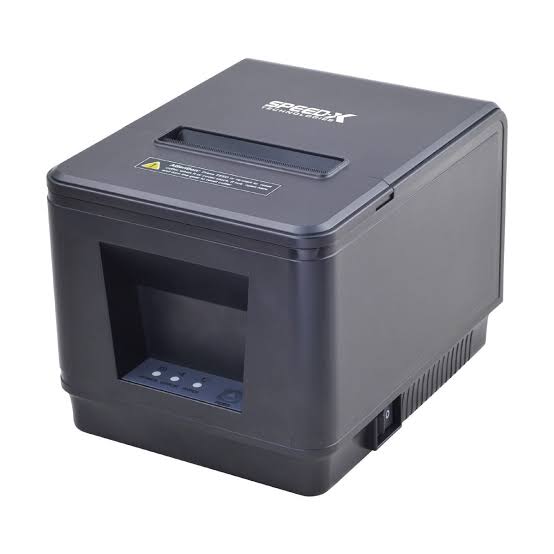
Understanding how thermal printers work can help businesses select suitable equipment and maintain consistent printing performance. From the movement of paper through the printer to the precise heating of individual printhead elements, several components work together to produce accurate results. Exploring the technology behind a Thermal Printer also helps users understand why this printing method is widely adopted across different industries.
What Is Thermal Printing Technology?
Thermal printing is a printing method that uses heat to produce text, images, symbols, and barcodes on compatible printing materials. The technology relies on a thermal printhead containing numerous tiny heating elements. These elements activate selected areas of the printing surface according to the information received from a connected device.
Thermal printing generally uses two main methods: direct thermal printing and thermal transfer printing. Both methods use heat, but they differ in how images are transferred onto the printing material.
Direct thermal printing creates images through a chemical reaction in heat-sensitive paper, while thermal transfer printing uses heat to transfer ink from a ribbon onto labels or other surfaces.
Both approaches are widely used because they can deliver consistent printing results without the conventional inkjet or laser printing process.
How Does a Thermal Printer Work?
The thermal printing process involves several coordinated steps. Although the exact mechanism varies depending on the printer type, the general operating principle remains similar.
1. Receiving Digital Printing Information
The process begins when a computer, point-of-sale terminal, mobile device, or another connected system sends printing instructions to the printer.
These instructions may contain text, numbers, graphics, barcode information, or formatting details. The printer’s internal controller receives the data and converts it into a format that the printing mechanism can understand.
The information determines which sections of the printhead need to generate heat and when the heating elements should activate.
2. Processing the Printing Data
After receiving the instructions, the printer processes the information and prepares the image for printing.
The controller organizes the content into a series of lines or dots. Each dot represents a small area that may need to be heated during the printing process.
The accuracy of this stage influences the positioning, alignment, and clarity of the final output.
3. Activating the Thermal Printhead
The thermal printhead is the most important component in the printing mechanism. It contains a row of tiny heating elements that can activate individually.
When the printer receives the processed data, selected heating elements generate heat according to the required image pattern.
The heating elements operate with precise timing and temperature control to create the desired text, graphics, or barcode patterns.
4. Moving the Printing Material
While the printhead applies heat, a motor-driven mechanism moves the paper or label through the printer.
A component called the platen roller maintains contact between the printing material and the thermal printhead. This controlled movement ensures that the correct areas receive heat during printing.
Consistent material movement is essential for producing properly aligned text and images.
5. Creating the Final Printed Output
The final stage depends on the printing method.
In direct thermal printing, heated elements activate the chemical coating on specially treated paper, producing visible marks.
In thermal transfer printing, heat melts or releases ink from a ribbon and transfers it onto the printing material.
Once the material passes through the printing mechanism, the completed receipt or label is ready for use.
Understanding the Two Main Thermal Printing Methods
Although direct thermal and thermal transfer printers share similar heating technology, their printing processes have important differences.
Direct Thermal Printing Process
<image-placeholder></image-placeholder>
Direct thermal printing uses chemically coated paper that reacts when exposed to heat. The printhead selectively heats the paper surface, causing specific areas to darken and form the required image.
The process follows these basic steps:
- A roll of heat-sensitive paper is loaded into the printer.
- The printer receives and processes the digital printing instructions.
- The printhead activates selected heating elements.
- The heated areas of the paper change color.
- The completed image appears on the paper.
This method does not require a ribbon, ink cartridge, or toner. It is commonly used for receipts, tickets, temporary shipping labels, and transaction records.
However, direct thermal materials may be sensitive to sunlight, heat, friction, and certain chemicals. Their suitability depends on how long the printed information needs to remain readable.
Thermal Transfer Printing Process
<image-placeholder></image-placeholder>
Thermal transfer printing uses a ribbon containing a heat-sensitive ink coating. The ribbon is positioned between the printhead and the printing material.
When selected heating elements activate, the ink transfers from the ribbon onto the surface of the label.
The process generally involves the following stages:
- The user loads compatible labels and a thermal transfer ribbon.
- The printer processes the digital image or text.
- The printhead heats selected sections of the ribbon.
- The ink transfers onto the label surface.
- The printed label moves through the printer and is released.
The durability of the final result depends on the ribbon formulation and label material. Wax ribbons are commonly used for general-purpose labeling, while resin ribbons are suitable for applications requiring greater resistance to environmental conditions. Wax-resin ribbons provide an intermediate option.
Thermal transfer printing is frequently used for industrial labels, product identification, asset tracking, and long-term barcode applications.
Key Components Involved in the Thermal Printing Process
Several mechanical and electronic components work together to ensure that thermal printing operates correctly.
Thermal Printhead
The thermal printhead generates the heat required to create images. Its heating elements activate according to the digital printing instructions.
Printhead resolution, commonly measured in dots per inch (DPI), influences the level of detail that a printer can reproduce. Higher-resolution models are useful for small text, detailed graphics, and compact barcodes.
Platen Roller
The platen roller is responsible for moving the printing material through the printer while maintaining consistent contact with the printhead.
A clean and properly functioning roller helps prevent uneven printing, media slipping, and alignment problems.
Control Board
The control board manages the printer’s internal operations. It receives data, processes commands, controls the printhead, and coordinates the movement of mechanical components.
It also supports communication between the printer and connected devices.
Sensors
Thermal printers use sensors to detect paper, labels, gaps, and other media characteristics.
For example, gap sensors help identify the spaces between individual labels, while black-mark sensors detect printed marks used for positioning. These features help the printer determine where each new printing area begins.
Motor and Gear Mechanism
The motor and gear mechanism control the movement of paper, labels, and ribbons. Proper synchronization ensures that printing materials move at the correct speed and remain accurately positioned.
Ribbon Supply and Take-Up Mechanism
Thermal transfer printers include a ribbon supply system that feeds unused ribbon into the printing area. A take-up mechanism collects the used ribbon after the ink has been transferred.
This system maintains consistent ribbon movement and supports continuous printing.
What Happens Inside a Thermal Printer During Printing?
The printing process involves a combination of electronic signals, temperature control, and mechanical movement.
When a print command arrives, the printer’s controller interprets the information and creates a pattern of dots. These dots determine which heating elements should activate.
The thermal printhead then generates heat at specific points. In direct thermal systems, the heat triggers a chemical reaction in the paper coating. In thermal transfer systems, it releases ink from the ribbon.
At the same time, the platen roller moves the material forward at a controlled speed. The printer repeats this operation line by line until the complete image has been produced.
The coordination between electronic processing and mechanical movement is essential for maintaining print quality and avoiding missing lines, blurred text, or distorted barcodes.
Factors That Affect Thermal Printing Quality
Several factors influence the clarity, consistency, and reliability of thermal printing.
Printhead Resolution
Resolution determines how many individual dots the printhead can produce within a given area. Common resolutions include 203 DPI, 300 DPI, and 600 DPI.
A standard receipt or shipping label may work well with 203 DPI, while detailed product labels and small barcodes may benefit from higher resolution.
Printing Speed
Printing speed affects how quickly the material moves through the printing mechanism. Excessively high speeds may reduce image clarity if the printhead cannot provide sufficient heating for the selected material.
Businesses should balance printing speed with the required output quality.
Temperature Settings
The printhead temperature must match the printing material and printing speed. Insufficient heat may produce faint images, while excessive heat can cause dark backgrounds, material damage, or unnecessary printhead wear.
Printing Material
Paper and label materials have different surface characteristics and heat sensitivities. Selecting compatible media is important for achieving consistent results.
Thermal transfer applications also require suitable ribbon and label combinations.
Printhead Cleanliness
Dust, adhesive residue, and other contaminants can interfere with heat transfer. Regular cleaning helps maintain consistent printing and reduces the risk of premature component wear.
Common Problems During Thermal Printing
Although thermal printers are generally reliable, certain problems can affect their operation.
Faint Printing: This may result from insufficient printhead temperature, low-quality paper, an unsuitable ribbon, or a dirty printhead.
Uneven Printing: Contamination on the printhead or platen roller can create inconsistent contact with the printing material.
Paper or Label Misalignment: Incorrect media loading or sensor positioning may cause labels to print in the wrong locations.
Missing Lines or Dots: Damaged heating elements or accumulated residue can prevent certain areas from printing correctly.
Ribbon Wrinkling: Incorrect ribbon tension, improper installation, or incompatible media can cause wrinkles and uneven ink transfer.
Most common issues can be reduced through correct installation, compatible consumables, regular maintenance, and appropriate printer settings.
Benefits of Understanding the Thermal Printing Process
Understanding how thermal printers operate offers practical advantages for businesses and everyday users.
First, it helps organizations select the correct printing method. Companies producing temporary receipts may prefer direct thermal technology, while businesses requiring durable product labels may choose thermal transfer printing.
Second, understanding the components makes troubleshooting easier. Employees can identify whether printing problems are related to media loading, printhead condition, sensor settings, or ribbon installation.
Third, knowledge of the printing process supports better maintenance practices. Regular cleaning and proper material selection can help improve printing consistency and extend equipment service life.
Finally, understanding thermal printing technology helps businesses evaluate printing speed, resolution, and connectivity requirements before purchasing new equipment.
Conclusion
Thermal printers work by converting digital information into controlled heat patterns that create text, images, and barcodes on compatible materials. Their operation depends on the coordination of the thermal printhead, platen roller, controller board, sensors, and other mechanical components.
The two primary methods, direct thermal and thermal transfer printing, serve different purposes. Direct thermal technology is suitable for applications requiring convenient, short-term printing, while thermal transfer technology offers more durable labeling options when paired with appropriate ribbons and materials.
By understanding the complete printing process, businesses can choose suitable equipment, improve output quality, troubleshoot common problems, and maintain reliable printing operations across different applications.