A Complete Guide to Choosing the Right Xprinter Thermal Printer
Choosing suitable printing equipment is an important decision for businesses that depend on receipts, product labels, shipping documents, and barcode printing. The right printer can improve daily productivity, simplify routine tasks, and support more organized business operations. However, with different printing technologies, specifications, and connectivity options available, selecting an appropriate model requires careful consideration.
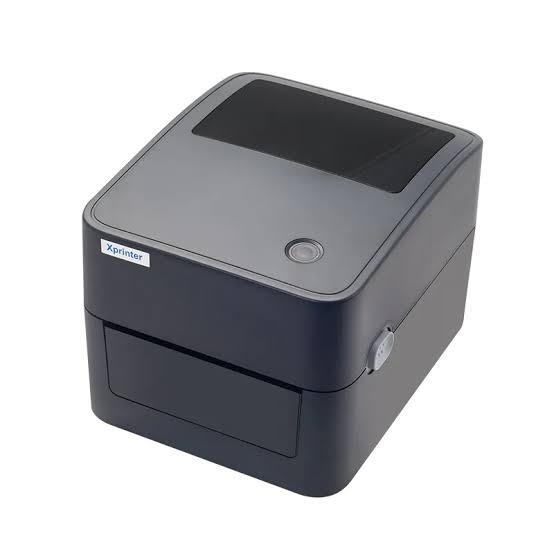
An Xprinter Thermal Printer can be considered for various commercial printing applications, including retail transactions, restaurant orders, warehouse labeling, and logistics operations. Before making a purchasing decision, businesses should understand their printing requirements and compare important features such as print resolution, speed, media compatibility, connectivity, and maintenance needs.
1. Identify Your Primary Printing Requirements
The first step in choosing a thermal printer is understanding what you intend to print. Different business activities require different printer configurations, and selecting equipment based on its intended application helps avoid unnecessary expenses.
For example, retail stores generally need receipt printers to generate transaction records, while warehouses require label printers for product identification and shipping operations.
Common printing requirements include:
- Receipt printing: Suitable for supermarkets, restaurants, retail stores, and service counters.
- Barcode printing: Useful for inventory management, product tracking, and retail identification.
- Shipping label printing: Supports packaging, order fulfillment, and logistics activities.
- Product labeling: Helps identify merchandise, storage locations, and packaged goods.
- Ticket printing: Used for transportation, parking facilities, and event management.
Identifying the main application makes it easier to narrow down the available printer options.
2. Understand the Different Types of Thermal Printers
Thermal printers generally use one of two printing technologies: direct thermal and thermal transfer. Understanding their differences is essential because each method serves different purposes.
Direct Thermal Printers
Direct thermal printers use specially coated paper or labels that darken when exposed to heat. A thermal printhead activates selected areas of the material to produce text, numbers, and graphics.
Their main characteristics include:
- No ink cartridges or toner required.
- Simple printing mechanisms.
- Convenient operation for frequent receipt printing.
- Fewer consumables compared with conventional printing systems.
However, direct thermal prints can fade when exposed to excessive heat, sunlight, or friction. This technology is generally suitable for receipts and labels that do not require extended durability.
Thermal Transfer Printers
Thermal transfer printers use a heated printhead to transfer ink from a ribbon onto paper or label material.
This method can produce more durable printing that is suitable for applications involving longer-term identification or exposure to certain environmental conditions.
Thermal transfer printing is commonly used for warehouse labels, industrial identification, and product labeling.
The choice between these technologies should depend on the required print lifespan, media type, and operating environment.
3. Consider Printing Speed and Daily Workload
Printing speed directly affects productivity in businesses that generate large numbers of receipts or labels.
A retail store with continuous customer transactions may require a printer capable of handling frequent printing without creating delays. Similarly, a warehouse processing hundreds of packages daily may benefit from equipment designed for consistent label production.
When comparing models, examine the manufacturer’s stated printing speed, usually measured in millimeters per second (mm/s).
However, actual performance can also depend on:
- Print resolution.
- Label or paper dimensions.
- Data transmission speed.
- Software processing.
- Graphics and barcode complexity.
- Printing frequency.
Choosing a printer that matches the expected workload helps maintain efficient operations without paying for unnecessary performance capabilities.
4. Evaluate Print Resolution
Print resolution determines how much detail a thermal printer can reproduce. It is generally measured in dots per inch (DPI).
Common thermal printer resolutions include 203 DPI, 300 DPI, and higher options in certain specialized models.
A 203 DPI printer is often sufficient for standard receipts, shipping labels, and many everyday barcode applications. Higher resolutions can be useful when printing smaller text, detailed graphics, or compact barcodes.
Before selecting a resolution, consider the intended output. A business printing simple transaction receipts may not need the same level of detail as a company producing small product identification labels.
5. Check Paper and Label Compatibility
Media compatibility is another important factor when choosing printing equipment. Not every thermal printer supports the same paper widths, label dimensions, thicknesses, or material types.
Businesses should review the following specifications:
- Maximum supported paper or label width.
- Minimum and maximum label dimensions.
- Roll diameter and core size.
- Supported media thickness.
- Continuous and gap-label compatibility.
- Direct thermal or thermal transfer material requirements.
Using incompatible printing materials can cause feeding problems, inaccurate positioning, and inconsistent output.
It is also important to consider whether the printer supports the types of labels or receipts currently used by the business. This can simplify purchasing and reduce unnecessary changes to existing workflows.
6. Choose Suitable Connectivity Options
A thermal printer needs an appropriate connection to communicate with computers, mobile devices, and business software.
Different models offer different connectivity interfaces, so compatibility should be checked before purchasing.
USB Connectivity
USB is commonly used for direct connections between printers and computers. It is relatively simple to install and suitable for individual checkout counters or workstations.
Ethernet Connectivity
Ethernet allows printers to connect to business networks. This can be useful in larger retail stores and warehouses where printing requests originate from multiple authorized workstations.
Bluetooth Connectivity
Bluetooth supports wireless communication with compatible mobile devices, tablets, and other equipment. It is particularly useful in certain portable printing environments.
Wi-Fi Connectivity
Wi-Fi provides wireless network connectivity for supported printers. It can reduce cable requirements and offer greater flexibility in equipment placement.
Serial Connectivity
Serial interfaces are used in some commercial and industrial environments, particularly where older systems or specialized equipment require this connection type.
The best connectivity option depends on the existing technology infrastructure and the way employees will use the printer.
7. Examine Software and Operating System Compatibility
Even a printer with suitable hardware specifications may not work effectively if it cannot communicate with existing business software.
Retailers, restaurants, and warehouses often use specialized applications for point-of-sale transactions, inventory management, shipping, and order processing.
Before purchasing, verify compatibility with:
- Windows and other supported operating systems.
- Point-of-sale applications.
- Inventory management platforms.
- Barcode generation software.
- Shipping and logistics systems.
- Available printer drivers and command languages.
It is also useful to confirm whether the printer supports the required programming interfaces or printing protocols.
Testing compatibility before deploying multiple units can help prevent installation problems and workflow disruptions.
8. Consider Printer Size and Installation Space
Physical dimensions matter when selecting printing equipment for a busy working environment.
Retail checkout counters often have limited space because they already contain computers, barcode scanners, payment terminals, and cash drawers. Restaurants may need compact devices that fit comfortably near service counters or kitchen stations.
Warehouses, on the other hand, may have dedicated printing stations with more available space.
Consider the following factors:
- Overall printer dimensions.
- Available workspace.
- Paper-loading accessibility.
- Cable management requirements.
- Ventilation and operating conditions.
- Portability requirements, if applicable.
Choosing an appropriately sized printer can improve workstation organization and make routine operation more convenient.
9. Compare Durability and Build Quality
A thermal printer used occasionally in a small office has different operational demands from one running continuously in a busy supermarket or warehouse.
Businesses with high printing volumes should examine construction quality, recommended operating conditions, and the manufacturer’s performance specifications.
Important considerations include:
- Expected daily printing volume.
- Printhead durability.
- Roller quality.
- Housing construction.
- Resistance to dust and other environmental factors.
- Availability of replacement components.
Durability should be evaluated in relation to the actual working environment rather than relying solely on general product descriptions.
10. Understand Maintenance Requirements
Maintenance affects both printing consistency and long-term operating expenses. Although thermal printers generally have fewer ink-related maintenance requirements, their internal components still need periodic attention.
A suitable maintenance routine should include:
- Cleaning the printhead with recommended materials.
- Removing dust and residue from the paper path.
- Checking rollers for wear or contamination.
- Inspecting sensors and media alignment.
- Updating drivers or firmware when appropriate.
- Replacing damaged components according to manufacturer recommendations.
Businesses should also consider whether technical documentation, replacement parts, and servicing support are readily available.
These factors can influence how easily equipment problems are resolved.
11. Calculate the Total Cost of Ownership
The initial purchase price is only one part of the overall investment. Businesses should consider all expenses associated with operating and maintaining the printer.
A complete cost evaluation may include:
| Cost Factor | What to Consider |
|---|---|
| Initial purchase | Printer price and installation expenses |
| Consumables | Thermal paper, labels, and ribbons |
| Maintenance | Cleaning materials and routine servicing |
| Replacement parts | Printheads, rollers, and other components |
| Energy usage | Electricity consumption during operation |
| Downtime | Potential productivity losses caused by equipment failure |
Direct thermal printers can reduce certain consumable expenses because they do not require ink or toner. Thermal transfer models, however, require compatible ribbons.
Comparing these costs over the expected equipment lifespan provides a more realistic picture of affordability.
12. Evaluate Technical Support and Warranty Coverage
Reliable technical support can make a significant difference when printing equipment becomes part of everyday business operations.
Before selecting a model, review the manufacturer’s warranty terms, troubleshooting documentation, driver availability, and servicing arrangements.
Businesses purchasing several printers may also benefit from understanding replacement-part availability and support procedures for larger installations.
Clear technical documentation can help employees resolve common problems without unnecessary delays.
13. Match the Printer to Your Industry
Different industries have different printing priorities. Selecting equipment according to the intended working environment can improve its usefulness.
Retail businesses: Prioritize fast receipt printing, POS compatibility, and convenient paper replacement.
Restaurants: Consider printing speed, kitchen order requirements, connectivity, and suitable receipt formats.
Warehouses: Focus on barcode clarity, label compatibility, durability, and integration with inventory systems.
Logistics companies: Examine shipping label dimensions, printing volume, software compatibility, and network connectivity.
Healthcare facilities: Consider readable identification labels, suitable media, and compatibility with relevant information systems.
This industry-based approach helps businesses concentrate on the specifications that matter most to their operations.
14. Test the Printer Before Large-Scale Deployment
When purchasing multiple printers, testing a sample unit before completing a large order can help identify potential issues.
A practical evaluation should include:
- Printing sample receipts and labels.
- Testing barcode scanning accuracy.
- Checking connectivity with existing devices.
- Evaluating software compatibility.
- Measuring printing performance under normal workloads.
- Inspecting paper-loading and maintenance procedures.
Testing provides useful information about actual performance and can help prevent costly mistakes when equipment is deployed across multiple locations.
Conclusion
Choosing the right thermal printer requires more than comparing prices or selecting a model with the highest printing speed. Businesses should evaluate their intended applications, printing technology, resolution, media compatibility, connectivity, software support, and expected workload.
A carefully selected thermal printing solution can support efficient transactions, accurate product identification, and organized business operations. By considering both immediate requirements and long-term operating costs, businesses can make informed purchasing decisions and choose equipment that remains suitable as their printing needs evolve.