Applications of Receipt Printers in Restaurants, Retail Stores, and Hospitality Businesses
Receipt printing is an important part of daily operations across many industries. Restaurants use printed tickets to communicate orders, retail stores provide transaction records to customers, and hospitality businesses rely on printed documents to support payments and service management. Although digital payment systems and electronic records have become increasingly common, printed receipts remain useful for documenting transactions and maintaining organized business processes.
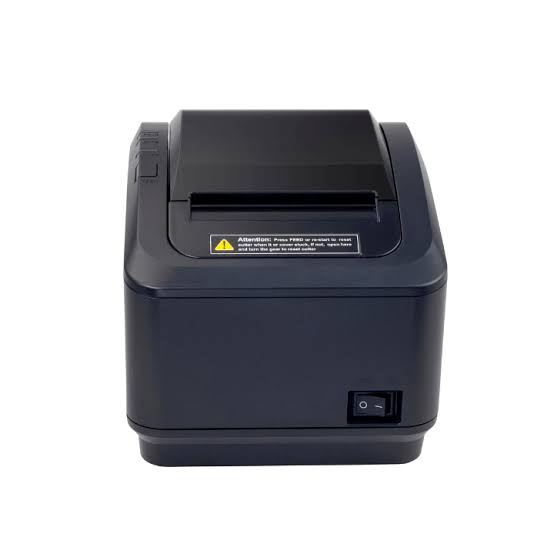
A modern Receipt Printer can support different operational needs depending on its printing technology, connectivity, speed, and compatibility with business software. Understanding how these devices are used across restaurants, retail environments, and hospitality services helps businesses choose equipment that matches their workflows.
1. Receipt Printers in Restaurant Operations
Restaurants handle several types of transactions, including dine-in orders, takeaway purchases, delivery orders, and customer payments. Receipt printers help manage these activities by producing printed records at different stages of the service process.
Printing Customer Bills
At the end of a meal, restaurants provide customers with bills showing ordered items, quantities, prices, taxes, discounts, and the total amount due. A clear printed bill helps customers review their purchases before completing payment.
Fast printing is especially useful during busy meal periods when employees need to process several tables and payment requests efficiently.
Generating Kitchen Order Tickets
Some restaurants use printers to produce kitchen tickets when orders are entered into a point-of-sale system. These tickets communicate food selections, special instructions, table numbers, and other preparation details to kitchen staff.
Depending on the restaurant’s setup, separate printers may be installed at different preparation stations. This can help organize orders and reduce the need for employees to carry handwritten instructions between the front and back of the restaurant.
Supporting Takeaway and Delivery Services
Takeaway counters and delivery operations often require printed order summaries and customer receipts. These documents help employees verify order details, organize packaging, and maintain transaction records.
In high-volume food businesses, reliable printing can support faster order handling and reduce confusion during peak periods.
2. Applications in Retail Stores
Retail businesses process transactions involving different products, payment methods, discounts, and return policies. Receipt printers help document these activities and support communication between customers and store employees.
Producing Purchase Receipts
After a sale, retail stores provide customers with receipts containing product descriptions, quantities, prices, taxes, and payment information. These records allow customers to verify purchases and keep evidence of transactions.
Supporting Returns and Exchanges
Printed receipts can make return and exchange procedures easier by providing transaction references and purchase details. Employees can use this information to check whether a product was purchased at the store and confirm relevant transaction information.
Some businesses also print return policies or exchange conditions at the bottom of receipts to make important information accessible to customers.
Printing Promotional Information
Retailers may include discount codes, loyalty program details, upcoming offers, or promotional messages on customer receipts. This provides another communication channel without requiring separate printed marketing materials.
Managing Multiple Checkout Counters
Supermarkets, department stores, and larger retail outlets may operate several checkout stations simultaneously. Each station can use a connected printer to produce receipts as transactions are completed.
Reliable printing helps maintain consistent checkout procedures and reduces delays caused by equipment interruptions.
3. Receipt Printers in Hotels and Hospitality Businesses
Hotels and other hospitality providers handle a variety of payments and service-related transactions. Printed documents can support front-desk operations, restaurant services, and administrative processes.
Hotel Check-In and Check-Out
Hotels may print payment receipts, additional-charge summaries, and transaction records during guest check-in or check-out. These documents help guests review charges and provide a physical record of completed payments.
Restaurant and Room Service Billing
Hotels with restaurants, cafés, and room service departments often need to manage separate orders and payment records. Printers can produce customer bills and internal order tickets, helping different departments coordinate their activities.
Guest Service Transactions
Hospitality businesses may also use receipt printers for transactions involving parking, minibar purchases, laundry services, and other additional facilities. Printed records help staff document charges and provide guests with clear transaction information.
4. How Different Receipt Printing Technologies Serve These Industries
The most suitable printing technology depends on the business environment, printing frequency, and type of document required.
Thermal Receipt Printers
<AsyncImage query=”thermal receipt printer printing paper point of sale retail counter” aspectRatio=”16:9″ maxHeight={190}/>
Thermal printers use heat-sensitive paper to produce text and graphics. They are widely used in retail stores, restaurants, and hospitality environments because they can print quickly without requiring traditional ink cartridges or ribbons.
Their compact designs also make them suitable for checkout counters and restaurant service stations where workspace may be limited.
Impact or Dot Matrix Printers
<AsyncImage query=”dot matrix impact receipt printer restaurant kitchen order ticket” aspectRatio=”16:9″ maxHeight={190}/>
Impact printers use a printhead that strikes an ink ribbon against paper. They are useful in certain environments where multi-copy documents are required or where printing conditions are more demanding.
Some restaurants use impact printers for kitchen tickets because their printed output can be suitable for environments where heat and moisture may affect ordinary thermal paper.
Mobile Receipt Printers
<AsyncImage query=”portable mobile thermal receipt printer handheld retail payment” aspectRatio=”16:9″ maxHeight={190}/>
Mobile receipt printers are compact devices designed for portable use. They can be useful for table-side payments, outdoor retail activities, delivery services, and hospitality operations where employees need to print receipts away from fixed counters.
Many models support wireless connectivity, allowing them to communicate with compatible mobile devices or POS systems.
5. The Role of POS Integration in Business Operations
Receipt printers generally operate as part of a broader point-of-sale system. The POS application records transaction information and sends formatted print commands to the connected device.
Integration allows businesses to automate receipt generation instead of requiring employees to prepare transaction documents manually. It can also help maintain consistent formatting across different checkout stations.
Before purchasing a printer, businesses should verify compatibility with their POS software, operating system, and available connection interfaces. Supported interfaces may include USB, Ethernet, Bluetooth, and Wi-Fi, depending on the model.
6. Benefits of Receipt Printers for Customer Service
Printed receipts provide customers with a convenient record of purchases and payments. This can be particularly valuable when customers need to verify prices, review itemized charges, request returns, or maintain expense records.
In restaurants, printed bills allow customers to check their orders before payment. In hotels, payment summaries help guests review accommodation and service charges. In retail stores, receipts support purchase verification and after-sales procedures.
Clear and consistent printing also contributes to a more organized checkout experience. When receipts are produced quickly, employees can complete transactions without unnecessary printing delays.
7. Improving Operational Efficiency Across Different Industries
Receipt printers can support internal workflows as well as customer-facing transactions. Their applications extend beyond simply producing proof of payment.
- Order coordination: Restaurants can use printed tickets to communicate orders between service counters and kitchen departments.
- Transaction documentation: Retailers can maintain physical records of purchases, refunds, and exchanges.
- Department coordination: Hotels can use printed transaction records to support communication between reception, restaurants, and service departments.
- Checkout organization: Multiple printers can serve different counters or service areas.
- Reduced manual work: Automated receipt generation reduces the need for handwritten transaction details.
These applications help businesses organize routine activities and maintain consistent procedures across departments.
8. Important Features to Consider When Choosing a Receipt Printer
Different businesses have different printing requirements, so equipment selection should be based on practical operating needs.
Printing Speed
High-volume retail stores and busy restaurants may benefit from faster printing because it helps reduce delays during frequent transactions. Smaller businesses may have less demanding speed requirements.
Print Quality
Receipts should contain readable text, accurate transaction details, and clear barcodes when required. Consistent print quality is important for customer records and internal documentation.
Connectivity
USB connections may be suitable for individual checkout stations, while Ethernet can support network-based installations. Bluetooth and Wi-Fi may be useful for mobile or flexible service environments.
Paper Compatibility
Businesses should confirm the supported paper width, roll diameter, and paper type before purchasing. Restaurants and hotels may have different requirements depending on the documents they print.
Durability and Maintenance
Equipment used throughout the day should have a suitable construction and accessible maintenance features. Regular cleaning and compatible paper supplies can help preserve performance.
Software Compatibility
A printer must work with the business’s POS application and operating system. Checking supported drivers and printing protocols can prevent installation and communication problems.
9. Applications in Small Businesses and Specialized Service Environments
Receipt printers are not limited to large retail chains or established hospitality companies. Smaller businesses can also use them to improve transaction documentation.
Cafés, food trucks, bakeries, salons, convenience stores, and repair shops may use compact printers to produce payment records and itemized receipts. Mobile printers can be particularly useful for businesses that operate in temporary locations or provide services outside a traditional storefront.
In specialized environments, printer selection should account for available workspace, transaction frequency, power access, and the need for wireless operation.
10. Digital Receipts and the Continuing Role of Printed Documents
Many businesses now offer electronic receipts through email, messaging applications, or customer accounts. Digital records can reduce paper consumption and make transaction information easier to store and retrieve.
However, printed receipts remain useful for customers who prefer physical records or need immediate documentation. Some businesses also operate in environments where electronic receipt delivery is not practical for every transaction.
A combination of digital and printed receipt options can give customers greater flexibility. Businesses should consider customer preferences, recordkeeping requirements, and environmental goals when deciding how to manage receipt delivery.
Conclusion
Receipt printers support a wide range of activities in restaurants, retail stores, and hospitality businesses. They produce customer bills, kitchen order tickets, purchase records, hotel payment summaries, and other transaction documents that help organizations maintain efficient workflows.
The right printer depends on the business’s transaction volume, operating environment, printing technology, connectivity, and software requirements. By selecting suitable equipment and maintaining it properly, businesses can support reliable transaction processing and provide customers with clear, convenient payment records.